

Best overall: ecobee Smart Thermostat Premium. Best for automatic schedule learning: Google Nest Learning Thermostat. Best for room-priority control: Honeywell Home T9. The best smart thermostats for forced air systems in 2026 match your furnace, air conditioner or heat pump before they add app controls.
- For best smart thermostats for forced air systems 2026, choose ecobee Smart Thermostat Premium after verifying compatibility.
- Google Nest Learning Thermostat suits households that want automatic schedule learning rather than manual programming.
- Honeywell Home T9 suits room-priority control; remote sensors do not independently control airflow.
- GSHA Services, LTD provides HVAC installation and repair for homeowners and businesses in Woodstock, Lake Bluff and surrounding areas.
Why this matters
A smart thermostat controls heating and cooling calls. It does not fix undersized ducts, a failing furnace or poor airflow. Replacing the thermostat without identifying the equipment can also remove functions that depend on a manufacturer's dedicated controller.
For your 2026 upgrade, start with the heating and cooling equipment, not the thermostat display. GSHA Services, LTD provides HVAC installation and repair in Woodstock, Lake Bluff and surrounding areas. Treat thermostat selection as an HVAC compatibility decision, not just a connected-home purchase.
What makes the best smart thermostat for forced air?
These criteria determine the recommendations below:
- Equipment compatibility: Match conventional furnaces, heat pumps, heating stages, cooling stages and any separate zone controller.
- Reliable power: Check the common wire, transformer and manufacturer-approved power arrangements before installation.
- Useful temperature sensing: Choose room sensors when the thermostat's location does not represent the rooms you occupy.
- Appropriate automation: Decide whether you want a fixed schedule, automatic schedule learning or room-priority settings.
- Practical daily control: Compare wall controls, app requirements and the controls available during an internet outage.
- Accessory support: Confirm support for installed humidification, dehumidification or ventilation equipment separately.
For this 2026 shortlist, compatibility is a pass-or-fail requirement. A thermostat with more features is not a better choice if it cannot operate your system correctly.
Smart thermostats at a glance
| Thermostat | Best for | Standout feature | Key limitation |
|---|---|---|---|
| ecobee Smart Thermostat Premium | Overall room-aware control | Remote room sensing and occupancy features | Accessory and equipment compatibility still need verification |
| Google Nest Learning Thermostat | Automatic schedule learning | Learns temperature preferences and scheduling patterns | Learning is less useful when you want an unchanged manual schedule |
| Honeywell Home T9 | Selecting priority rooms | Room-based temperature and occupancy sensing | Sensors cannot independently redirect duct airflow |
| Sensi Touch 2 Smart Thermostat | Straightforward touchscreen scheduling | Touchscreen controls and app-based scheduling | Requires a common wire; optional room sensors are separate devices |
| Amazon Smart Thermostat | Alexa-centered households | Alexa integration and app-based routines | Requires a common wire or compatible power arrangement; no room-sensor control |
The table separates use cases rather than declaring every model interchangeable. Confirm the exact model and its current compatibility documentation before ordering; a product-family name is not enough.
1. ecobee Smart Thermostat Premium: best for room-aware control
The ecobee Smart Thermostat Premium combines wall controls, app access and remote room sensing. Its occupancy features help it account for where people are rather than relying only on the temperature beside the thermostat.
That makes it the default recommendation when your hallway reading does not represent your living room or bedroom. The ecobee Smart Thermostat Premium is the best overall choice here for households that want room-aware forced air control, subject to verified equipment compatibility.
ecobee Smart Thermostat Premium pros:
- Remote sensing adds temperature information from occupied rooms.
- Occupancy features support comfort settings tied to household activity.
- Wall controls and app access provide different ways to adjust settings.
ecobee Smart Thermostat Premium cons:
- Room sensing cannot correct restricted ducts or independently open dampers.
- Accessory control requires an equipment-specific wiring check.
- Extra automation takes more setup than a simple fixed schedule.
Best for: Households that want room sensing and occupancy-based control together.
Verdict: Buy the ecobee Smart Thermostat Premium after confirming the HVAC wiring and planned accessory controls.
2. Google Nest Learning Thermostat: best for schedule learning
The Google Nest Learning Thermostat learns from temperature adjustments and household scheduling patterns. Choose it when you want the thermostat to help build the schedule instead of programming every change yourself.
This recommendation refers to the fourth-generation Google Nest Learning Thermostat, not every thermostat sold under the Nest name. Compatibility and sensor support are model-specific, so use the documentation for the exact device.
Google Nest Learning Thermostat pros:
- Automatic learning reduces the need to build a schedule manually.
- Temperature-sensor support adds information beyond the thermostat location.
- Wall controls let you make immediate temperature adjustments.
Google Nest Learning Thermostat cons:
- Automatic schedule changes are a poor fit if you want settings to stay fixed.
- Different Nest models have different wiring and sensor requirements.
- Remote sensing does not create independently controlled HVAC zones.
Best for: Households that prefer automatic schedule learning over manual programming.
Verdict: Buy the Google Nest Learning Thermostat for learning features; skip it if an unchanging schedule is your priority.
3. Honeywell Home T9: best for choosing priority rooms
The Honeywell Home T9 uses compatible room sensors to inform temperature control and identify occupancy. Its room-priority approach suits households that want to focus on particular rooms at different times.
For example, you can prioritize the rooms you use rather than assuming the hallway is representative. Remember the physical limit: a thermostat changes equipment operation, while ducts and dampers determine where the conditioned air goes.
Honeywell Home T9 pros:
- Room-priority settings make the control strategy explicit.
- Compatible sensors provide temperature and occupancy information.
- App access supports schedule and temperature adjustments away from the wall.
Honeywell Home T9 cons:
- Additional room coverage requires compatible sensors.
- Prioritizing a distant room can change temperatures elsewhere.
- Sensor settings cannot repair a duct imbalance.
Best for: Households that want to choose which rooms influence heating and cooling.
Verdict: Buy the Honeywell Home T9 for room-priority control; hold if the real problem is uneven airflow that needs repair.
4. Sensi Touch 2 Smart Thermostat: best for simple scheduling
The Sensi Touch 2 Smart Thermostat combines touchscreen controls with app-based scheduling. It suits households that want to set a predictable routine and make occasional adjustments without relying on automatic schedule learning.
Compatible Sensi room sensors provide an additional sensing option. Decide whether you need those sensors before comparing the thermostat alone with another model's complete setup.
Sensi Touch 2 Smart Thermostat pros:
- Touchscreen controls keep routine adjustments accessible at the wall.
- App scheduling supports a deliberately programmed household routine.
- Compatible room sensors extend temperature sensing beyond the thermostat.
Sensi Touch 2 Smart Thermostat cons:
- A common wire is required.
- Optional room sensing requires additional compatible devices.
- Equipment compatibility still depends on the installed system and wiring.
Best for: Households that prefer straightforward scheduling and touchscreen operation.
Verdict: Buy the Sensi Touch 2 Smart Thermostat for predictable scheduling; hold until the common-wire connection is confirmed.
5. Amazon Smart Thermostat: best for Alexa-centered homes
The Amazon Smart Thermostat connects thermostat control with Alexa. Choose it when Alexa already forms part of your household routine and you do not need remote room-sensor control.
It is the simplest use-case recommendation in this list, not a substitute for equipment checks. Verify the supported HVAC configuration and power arrangement before choosing it for a furnace or heat pump.
Amazon Smart Thermostat pros:
- Alexa integration fits an existing Alexa-centered household.
- App controls support temperature adjustments and scheduling.
- A focused feature set avoids paying attention to unused room-sensor functions.
Amazon Smart Thermostat cons:
- It does not provide remote room-sensor control.
- Installation requires a common wire or compatible power arrangement.
- Alexa integration offers little benefit if you do not use that ecosystem.
Best for: Households that want Alexa-connected control without room sensors.
Verdict: Buy the Amazon Smart Thermostat for Alexa integration; skip it when room-based temperature sensing is essential.
Check your forced air system before buying
Forced air describes air distribution, not the thermostat's electrical requirements. A gas furnace with central air, a heat pump with backup heat and a communicating system can all move air through ducts while needing different controls.
Conventional residential thermostat circuits commonly use 24 volts AC. Line-voltage heating controls can use 120 volts or 240 volts and are not interchangeable with low-voltage smart thermostats. Never identify voltage from wire color alone.
Power off
Turn off power to the HVAC equipment before removing the thermostat or handling wiring. If you cannot identify the correct disconnect or circuit, stop and use a qualified technician.
Record wiring
Photograph the existing terminal connections before disconnecting anything. Record terminal labels, not just wire colors, and look for unused conductors without assuming they are connected at the equipment.
Identify equipment
Record the furnace, air conditioner or heat pump model. Identify heating and cooling stages, backup heat, zone controls and connected accessories. A heat pump's reversing-valve configuration also needs the correct setup.
Check compatibility
Use the manufacturer's checker for the exact thermostat model. A conventional terminal layout does not prove compatibility with a proprietary communicating system; replacing its controller can remove equipment-specific functions.
Confirm operation
After installation, verify heating, cooling, fan operation and any connected accessories. For heat pumps, confirm backup-heat settings and changeover behavior rather than stopping once the display turns on.
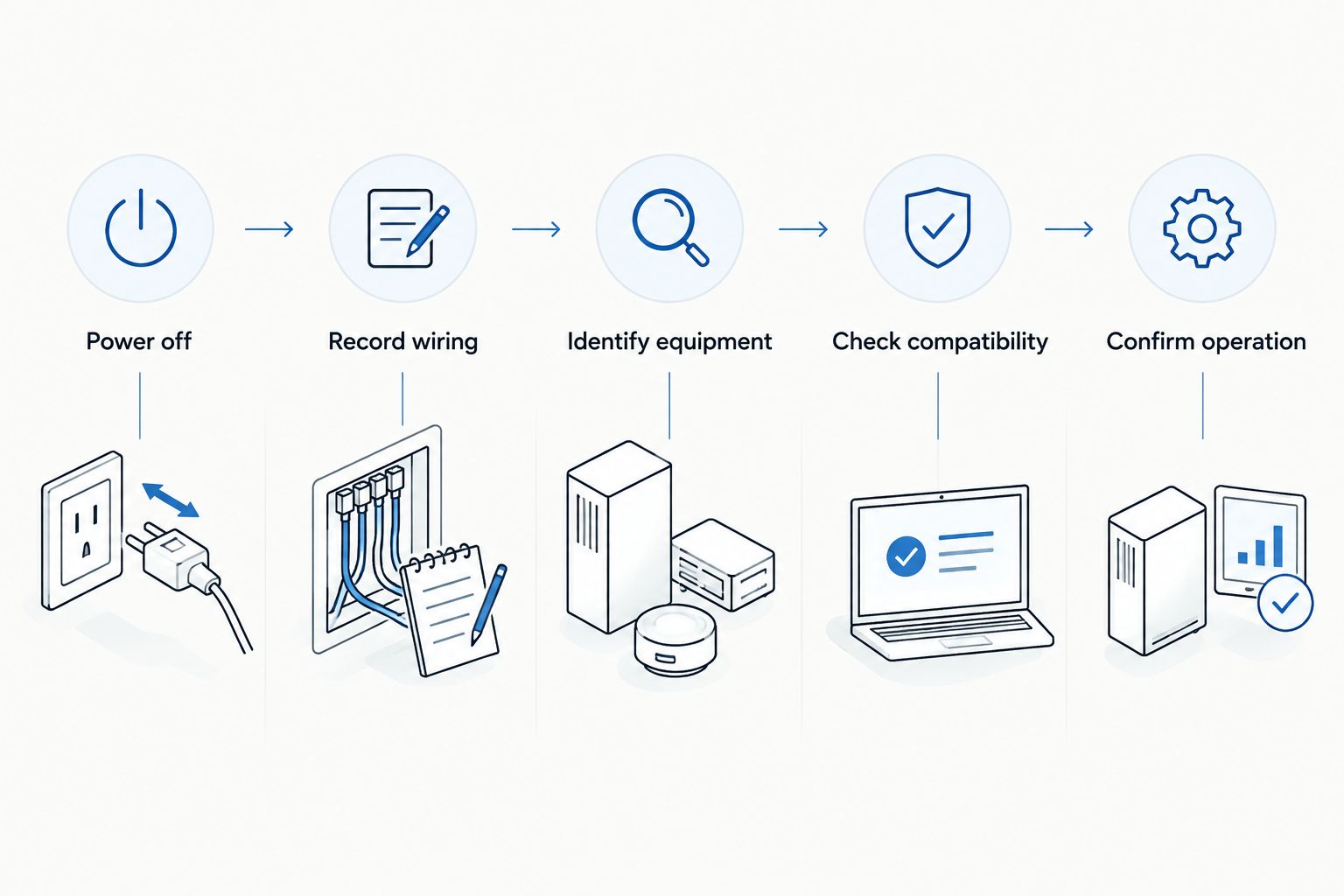
GSHA Services, LTD provides forced air HVAC installation and repair. If your 2026 thermostat replacement involves unfamiliar wiring, backup heat or a dedicated equipment controller, have the system identified before choosing the control.
Plan your thermostat replacement
Discuss your HVAC equipment and installation needs before selecting a thermostat.
Room sensors are not HVAC zoning
A remote sensor reports conditions in another room. The thermostat then changes heating or cooling operation based on its settings. In a conventional single-zone system, that change affects the entire connected duct system.
Zoning uses additional controls and dampers to manage separate areas. Do not buy room sensors expecting independent bedroom temperatures. If one room stays uncomfortable, check airflow, duct condition, insulation and equipment operation first.
If furnace replacement is also part of your project, the guide to gas furnace brands for Illinois winters provides a separate equipment comparison. Select the furnace and thermostat as a compatible system, not as unrelated upgrades.
How the thermostats were ranked
The 2026 ranking prioritizes equipment compatibility, temperature sensing, automation style and practical controls. Each thermostat receives a distinct recommendation: overall room-aware control, learning, room priorities, straightforward scheduling or Alexa integration.
This is a feature-based buying guide, not a claim of hands-on testing or measured energy savings. No thermostat earns a recommendation for savings that were not measured for your home.
Which smart thermostat should you choose?
Choose the ecobee Smart Thermostat Premium as the default for room-aware control. Choose the Google Nest Learning Thermostat for automatic learning, the Honeywell Home T9 for explicit room priorities, the Sensi Touch 2 Smart Thermostat for programmed routines or the Amazon Smart Thermostat for Alexa integration.
For a 2026 replacement, keep a compatible manufacturer controller when a generic smart thermostat would remove equipment functions. GSHA Services, LTD provides HVAC installation and repair for homeowners and businesses; the equipment configuration determines the next move.
FAQ
What’s the best smart thermostat for a forced air furnace?
The ecobee Smart Thermostat Premium is the default recommendation here for room-aware control, provided it supports your furnace and connected equipment. Confirm wiring, heating stages and any accessory controls before buying.
Can a smart thermostat work with a gas furnace and central air?
Yes, compatible smart thermostats can control conventional gas furnaces paired with central air conditioning. Check the exact thermostat against the system’s wiring and heating and cooling stages.
Do I need a common wire for a smart thermostat?
The common-wire requirement depends on the thermostat and its approved power arrangement. The Sensi Touch 2 requires a common wire; other models need their own compatibility and power checks.
Is the Nest Learning Thermostat better than ecobee?
The Google Nest Learning Thermostat is the better fit for automatic schedule learning; the ecobee Smart Thermostat Premium is the default here for room-aware control. Choose by the control method you want and the equipment each model supports.
Will room sensors fix a hot bedroom?
Room sensors do not fix restricted airflow or independently cool a bedroom. They change the temperature information used to control the connected HVAC system, which can affect other rooms.
Can I replace a communicating thermostat with any smart thermostat?
No, a communicating thermostat is not automatically interchangeable with a conventional smart thermostat. Check the equipment manufacturer’s approved controls and the functions that a replacement would retain.
Does a smart thermostat still work without Wi-Fi?
Compatible installed thermostats retain local heating and cooling controls without an internet connection, but remote app access and cloud-dependent functions require connectivity. Check the exact model’s offline behavior before buying.
One last thing
The best thermostat upgrade can be keeping the existing controller. If it already manages a communicating furnace, heat pump or zoning system correctly, replacing it for a preferred app can sacrifice useful equipment functions. Confirm what the current controller does before removing it.
Related guides
- Central air conditioners ranked by SEER
- How much does AC installation cost?
- Ductless mini-split brands for home additions

